Finding silent errors — diagnostics & check rows
Most of what goes wrong in a model does not raise an error. A reference whose source dimension has no transfer rule reads the first item of that dimension. A mapping rule that matches nothing skips its rows. A parent item on a non-hierarchical dimension simply never rolls up. Each of these produces a number: a plausible, confidently-formatted, wrong number, or a zero where a value belonged.
That is the failure mode this page is about, and there are two different checks for it, because no single one can catch both halves.
The two checks
Cube diagnostics analyse the model's formulas and cross-cube references without evaluating a single cell. The pass is read-only and reports every configuration that is set up to read 0, blank, or the wrong value:
- an item code or a reference name that does not resolve;
- a reference whose source dimension has no transfer rule, so it silently reads that dimension's first item — and a mapped reference whose mapping does not cover every item;
- a schema attribute with missing values, or used without the time dimension it needs;
- a parent item on a non-hierarchical dimension, which never rolls up;
- an item code that collides with a code in another dimension;
- an undetermined crossing — two formula dimensions crossing a nonlinear formula with no solve order between them, where the winner is decided internally and every linear subtotal above it still looks right;
- a product of two cross-cube values where neither declares a non-sum aggregation — one of them is a rate, and at every subtotal the crossing then computes (Σ quantity) × (Σ rate) instead of Σ (quantity × rate).
Check rows are the evaluated half. A check row is the convention every finance
model already uses: a formula item that must come out at zero, classically
Check = TotalAssets - TotalLiabilitiesAndEquity, or a cash-flow tie-out.
Evaluating them is what tells you whether the model balances.
Why you need both
The static pass never computes anything, so it reports no findings on a model that has been out of balance for months — the configuration is fine; the numbers are not. The evaluated pass only proves the invariants you actually wrote down; it says nothing about a reference quietly reading the wrong item on a row you never asserted anything about.
The practical habit: run diagnostics after building or restructuring a model, and whenever a number is unexpectedly 0 — the silent fallbacks above are the usual cause. Evaluate the check rows after loading data, and again after any change to the formulas that feed them.
Writing a check row that works
Three things decide whether a check row is worth having:
- It must be a formula item. A row typed with a value can never assert anything: it sits at 0 while the model is out by any amount at all. This is the most common way a check row is worthless, and it looks identical to a working one in the grid.
- Name it so it is found. Check rows are identified by convention — a code or description reading like check, balance check, control total, diff, or écart — or by naming the items explicitly when you run the check.
- Expect a tolerance, not an exact zero. Floating-point error accumulates along a long formula chain, so the default tolerance is half a cent. Anything under it is drift; anything over it is a real difference.
Every page slice is evaluated, within a bound, so an imbalance confined to one region or one scenario is not missed by a check that passes on the slice you happen to be looking at.
Where these show up
In the cube editor. The Checks button in the cube toolbar lists every diagnostics finding for the open cube in a side panel — errors first, then warnings, each with the dimension, item or reference it concerns. The badge on the button counts the errors and warnings, red as soon as there is an error; a cube with nothing to act on shows no badge at all. Notes — findings that describe something to know rather than fix, such as a cell-driven lookup that can only be checked at runtime, or check rows the static pass cannot evaluate — sit collapsed at the bottom, and anything the bounded analysis skipped is listed under Not analysed rather than dropped in silence. From a finding, Open item jumps to the item's formula and Open references to the reference it names. The list refreshes as you edit formulas and references; the refresh button in the panel header re-runs it on demand.
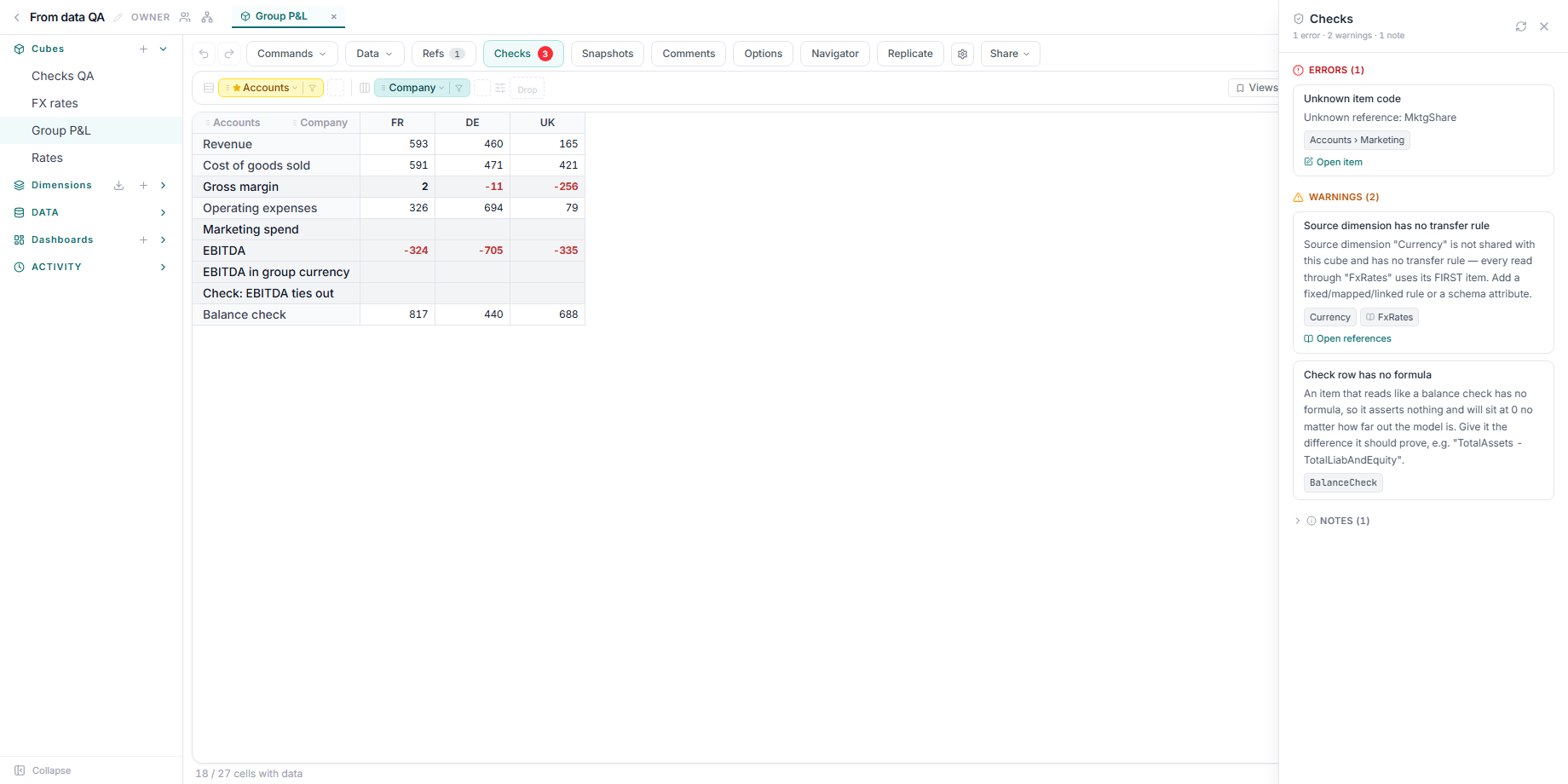
As tools. The same analysis runs as the assistant's cube-diagnostics tool and from an MCP client, and check rows are evaluated the same way — ask the assistant to diagnose a cube or check its assertions.
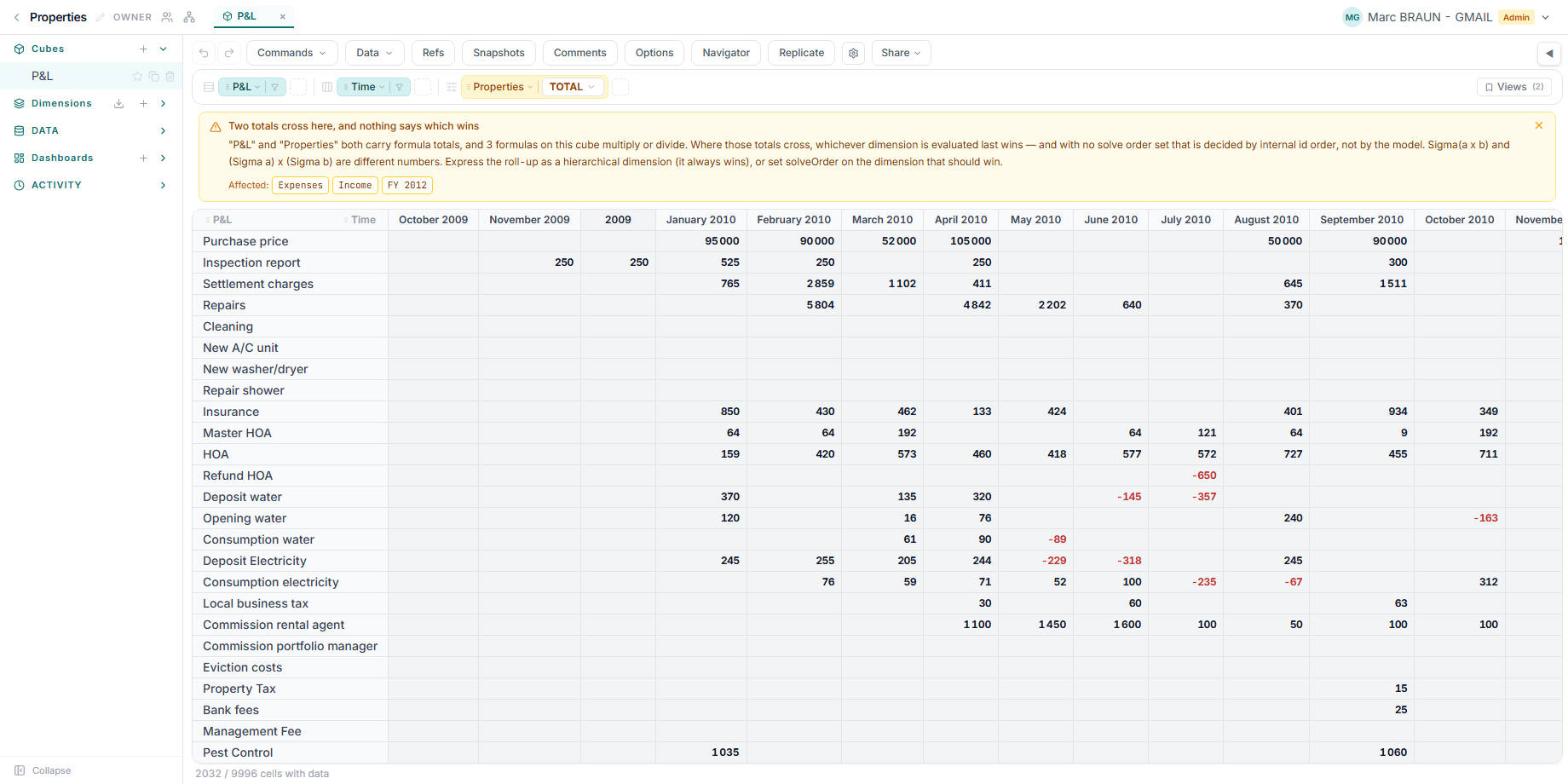
One finding also surfaces on its own: the undetermined crossing appears as an advisory above the grid, with a one-click way to let XCubes decide the solve order. Dismissing it is permanent for that cube in that browser; the Show hidden warnings toggle in the Calculation Order tab of Cube Settings brings it back, and the Checks panel keeps listing it either way.
For the modelling method that puts these checks to work on a real reconciliation, see Build financial statements from a ledger export. For what the silent fallbacks actually are, see Reference transfer options.